Good afternoon, y’all!
I have decided to take the plunge and switch over to Graphene OS. Is there anything I need to know before I use the web installer? I’m a bit bummed about having to set up all my apps again, but I’m exporting all my settings, thanks FOSS apps! to help with the transition. Most of my data is fully backed up through Nextcloud, so I’ll be able to just jump straight in with my photos and data.
So yeah, any tips or advice would be greatly appreciated before I go through with it tonight. Thanks, y’all and again, I love being a part of the Lemmy community.
Good on ya!
Is there anything I need to know before I use the web installer?
Nope, it’s S tier, or was for me, just works. (but uses a chrome browser for ungodly access, on the flipside, you get network deny access to all your android apps, which is godly)
As you transition, I recommend a second user with sandboxed google and a primary without. Over time you’ll learn to do without (FDroid is your friend), but every now and then you’ll want something and there it is, put all the crap you thought you needed in that user, and over time you’ll find alternatives. A while later you’ll find yourself google free, but if you actually need maps, it’s a swipe, tap and password away.
Welcome freedom.
Good luck. I switched a long while back now, and I love it. I went back to using a phone cover with space for a physical payment card, and I honesty never miss having Google Pay.
There were a couple of other items specific to Denmark that I had issues with, one I solved and it now works (MobilePay), the other I replaced with a dongle (MitID). Outside of those two, everything else worked flawlessly from the start.
There is a lot more control available to you, and I’ve found the settings and user experience very easy to figure out.
deleted by creator
I just had to tweak the permissions for MobilePay, I cannot remember exactly which, but I think it was something about allowing it to use the Play Store integrity layer? It was a quick fix in any case, and they have some advice on the Graphene site.
For banking Revolut works with no issues. I have not tried my main bank, I never use their app, always do my banking on my laptop anyway.
Mobilepay works as does my banking apps.
I still use googol wallet to pay, but i do that on my $50 android watch
I have separate profiles:
- main user has no Google Play services or Gapps: just F-Droid apps and a couple of play store apps I use daily (anonymously via Aurora Store app)
- Aurora profile has other playstore apps that will run without Google Play Services
- PlayStore profile is for anything that requires full Google Play Services (banking, purchased apps)
- Work profile is full-on Google everyting (Google school)
- Location is on, but only shared with Organic Maps, FindMyDevice (FMD) and Transit.app
- USB port is power-only (no data).
Some compromises I’ve made:
- I have fingerprint unlock enabled (but not on my password vault or PlayStore/Banking profile)
- I tap-to-pay with a Garmin watch ( you only need the Garmin app to set-up the credit card, then it can be deleted )
But… I think starting-out, don’t worry about it. If you load all the same apps as on your old phone, into a single main profile, it’ll still be a huge improvement.
Good recommendation. Good to remember that each app has its own sandbox so for most scenarios you are all set anyways (except running google play in general you may be against).
An excellent middle ground, if preferred, would be your main profile with everything that works anonymously and without google, etc, then a second profile that is not so anonymous (ie banking, google maps, etc).
You also likely need your password manager app in both profiles.
p.s. if you also use fingerprint (or any biometric) unlock, remember you can hold the power button to go into lockdown if you ever have a security threat (ie think you might be arrested or robbed or whatever like that). This disables biometrics and requires your pin. (i believe you should do this even if you use only a pin since it takes your phone into a BFU state, which you can google more about if interested).
How the holding of the power btn works? I tried it just now and it just brought the menu for doing the lockdown/reboot/shutdown (i.e. advanced boot menu or something).
I think it would be better to just hold the button down in out of the view and it would go into lockdown mode…?
I like this idea
Is fingerprint unlock not secure/private on android?
in many jurisdictions you Can be forced to give your biometric data to unlock. a pin cannot as of 2026 be forcefully extracted from you against your will.
Very interesting. I was cpnsidering using separate profiles, but I read somewhere that google services is sandboxed anyway, so having it all in 1 profile is fine.
What I will need a separate profile for though, is for banking apps. I have one which is adament that I use a keyboard app from the play store and will refuse to function if I have one from F-droid installed.
One thing that is easy to overlook - use a high quality USB cable to connect the phone to your PC for web installation of the OS. There are many garbage-quality cables floating around out there that may charge a small accessory but could be lacking in the data transfer department.
Installing it works best with standard vanilla Chromium. If you have issues, it may be because you don’t have ADB or the Android SDK installed on your computer. Just follow the directions, and it will run itself. Its simplicity is honestly a thing of beauty. And if you fuck up, you can (almost) always flash it back to stock Android with Google’s own WebUSB application.
After that? Getting a launcher that can install custom icons was a priority for me personally. I’ve heard awesome things about Lawnchair, but Pear Launcher is nice too. Aurora Store is a must if you don’t want the Play Store but still want play store apps (disclosure: It undermines some of the important security features of your phone’s setup to do this, and the GOS devs themselves strongly condemn the practice. F-droid and Obtainium are, imho, the better solution for most things. But also, bank apps and Discord are essential for me.) Shelter from F-Droid is an excellent tool that lets you set up certain apps in a work profile, which makes toggling certain apps on and off very easy so it uses even less bandwidth and battery power.
For apps, I recommend the following replacements:
-
Play Store -> Accrescent and F-Droid
-
Images -> Aves Libre
-
Maps -> CoMaps, Organic Maps, or OsmAND
-
Google Translate -> SimplyTranslate
-
Weather -> BreezyWeather
-
YouTube -> PipePipe or Clipious
-
Keyboard -> HeliBoard
-
Stock utility apps -> Fossify from F-Droid
Beyond that, just enjoy it. It’s so simple and so quiet. I mean mentally quiet. So few pop-ups, so little fuss, it’s remarkably pleasant.
funnily enough, I’m using almost all those apps already!
Sounds like the OS is the last bridge you need to burn, then! Welcome to the FOSS side of the Force!
-
Congrats! I made the switch a few months ago and haven’t looked back. Highly recommend everyone switch to GrapheneOS, even if you still use Google Play Services or other Google apps (obviously trying to get away from those is always the right move but it isn’t that simple for most people)
Now just wish Google Pay or some other contactless payment could work with it…
yeah, contactless pay bums me out a bit, but I use cash a lot more nowadays to support local business. I’ve moved so many things away from Google after selling my soul to them when they were “do no evil”, and it was just so daunting. But after a year of fully moving things over, it’s so much better. FOSS apps are designed better, half the time, and privacy is always a plus!
Yeah I got a MagSafe case and started using a MagSafe wallet I had from when I was on iPhone so I usually just use my physical cards now. Would be nice to not have to worry about forgetting my wallet but oh well.
I’m pretty much completely on FOSS now and really the only thing I miss, other than G Pay and compatibility with what other people use, is Google Maps, but Magic Earth is decent.
It does. You just need to find one.
In my part of the world (UK) I use Curve for contactless payments using GrapheneOS.
As far as I know there’s nothing that works in the US
Correct. In the US there is no entity that is supporting it. Technically any of our banks could create an app that supports it, but they’re lazy and cheap.
I tried to join Curve. For whatever reason they couldn’t verify my ID from the photo I sent, and that was that. No opportunity to redo, and they never replied to my support request email.
Yep. Their support is abysmal. I had the same issue - twice! Keep at it. I found poking them on Xitter got some traction.
Once I got verified, it’s worked flawlessly.
They’ve now been acquired by Lloyds Banking Group so, hopefully, things on that front will slowly improve.
Oh.
My bank is Lloyds, and their app not working on Graphene is a huge part of why I tried to apply for a Curve account.
Bugger.
I use my cheap samsung watch to pay. I have it paired on my gOS
Use Obtainium, get your apps directly from the code repositories !
I prefer f-droid builds whenever possible. Some github apks will still include google libraries, or not quite mention where they connect. F-droid goes the extra step of checking all of these for you, and give you warnings of any unintended connectivity for example. They’re quite strict for a reason. And I appreciate it.
This depends whether you care about security or software freedom guarantees. Because if it’s security that is the priority, F-Droid is a much weaker option than Obtanium+Appverifier because they use their own signing keys for nearly all apps. If F-Droid’s build infrastructure is ever compromised, then almost every app you have downloaded through it is also compromised. The inability for developers to control their own signatures is part of the reason Signal does not release on F-Droid.
Accrescent is a much better option than anything else because it still allows developer-managed keys, although it doesn’t have many apps. Google Play (although it does have high-security infrastructure) has the same problem as F-Droid of centrally managed keys. Obtanium with Appverifier at least lets you ensure that your app is signed by the developer.
- Setup private space with play services to use for apps that require it like banking.
- Use obtanium for updating apps automatically.
- One of the hardest things to replace is google maps. I use here we go maps and its probably the closest you can get however it isn’t Foss.
- FairEmail and Thunderbird are probably the two best mail clients. I use Thunderbird be cause it looks a bit better. Note however without play services email notifications will be updated every hour. If you want instant email notifications install in private space with play services.
- If you use signal I would try the fork of the client called molly. It uses less battery for notifications.
- Using an email provider that also has CalDav/Carddav like posteo can give you a simple cloud backed up calendar and contacts for really cheap without the need to self host. Use the davx5 app to connect. Davx5 calendar integrates well with etar and fossify calander
-How to setup your private spaces and profiles will be the biggest pain in mental considerations. This is one of the biggest differences allowed by Graphene. Also, not all apps like to be on a secondary profile (I’m looking at you, intune). My setup so far is a main google-less profile with f-droid, obtanium and all my foss apps…an insular ‘work’ profile, where I have all my banking and more or less secure apps, a ‘hidden profile’ (is that the name?), where I have a bit less trustworthy apps, food delivery, uber, gmaps etc (the difference between the work and the hidden profile, is work can be paused manually, but will keep working if you want it to in the background while the screen is off…while the hidden profile closes a few minutes after turning the screen off). Then secondary profiles for absolute garbage untrustworthy apps that I know try to gather as much info from you as possible. -Rather than obtanium, I prefer f-droid when possible. Better general oversight of the apps. I- think thunderbird can be set to check more frequently. I haven’t noticed any missing emails that get downloaded as I open. But maybe I don’t check my email so frequently. -Does Molly work on its own, without having to use some third-party notification setup such as ntfy?
- For the private space lock you can set it to “only after device restarts” if you want to. This will mean you only need to unlock it once and it works as a work profile without the need to install a work profile app. (Or if you need your work profile for something like Microsoft intune for work like me)
- As for molly you can set notifications as websocket which doesn’t required a unified push app like ntfy. This creates a websocket between signal servers and the molly app, similar to how ntfy creates a web socket between ntfy and an ntfy server. So if you are using ntfy for multiple apps in can save battery instead of running multiple websockets you only run on. But if you only use it for signal you may as well use mollys built in websocket notifications.
How do you get Obtainium to update automatically? Mine refuses to no matter which settings I try.
If an app has multiple apks like a play store version and a non play store version it won’t update automatically.
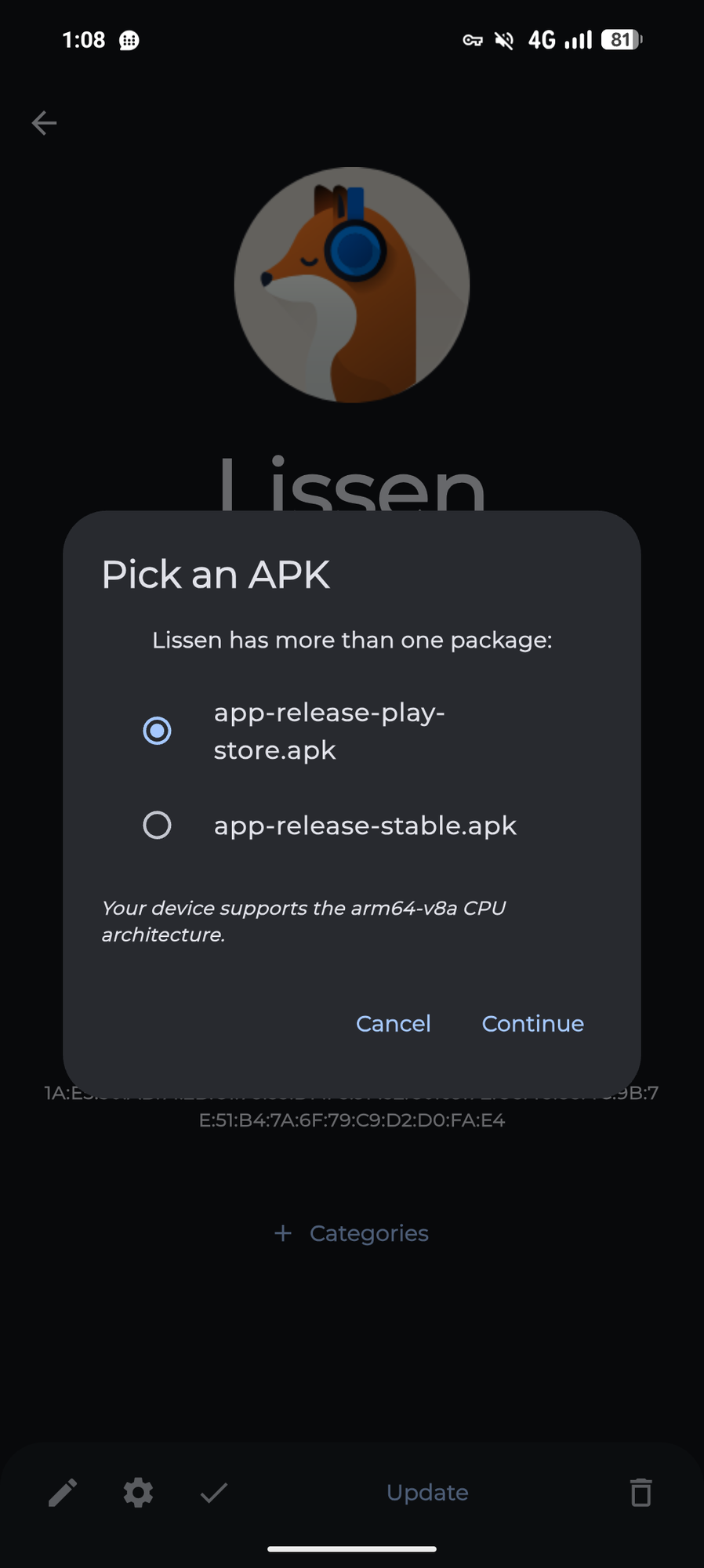
To fix this you need to add a filter for the apk name like this:
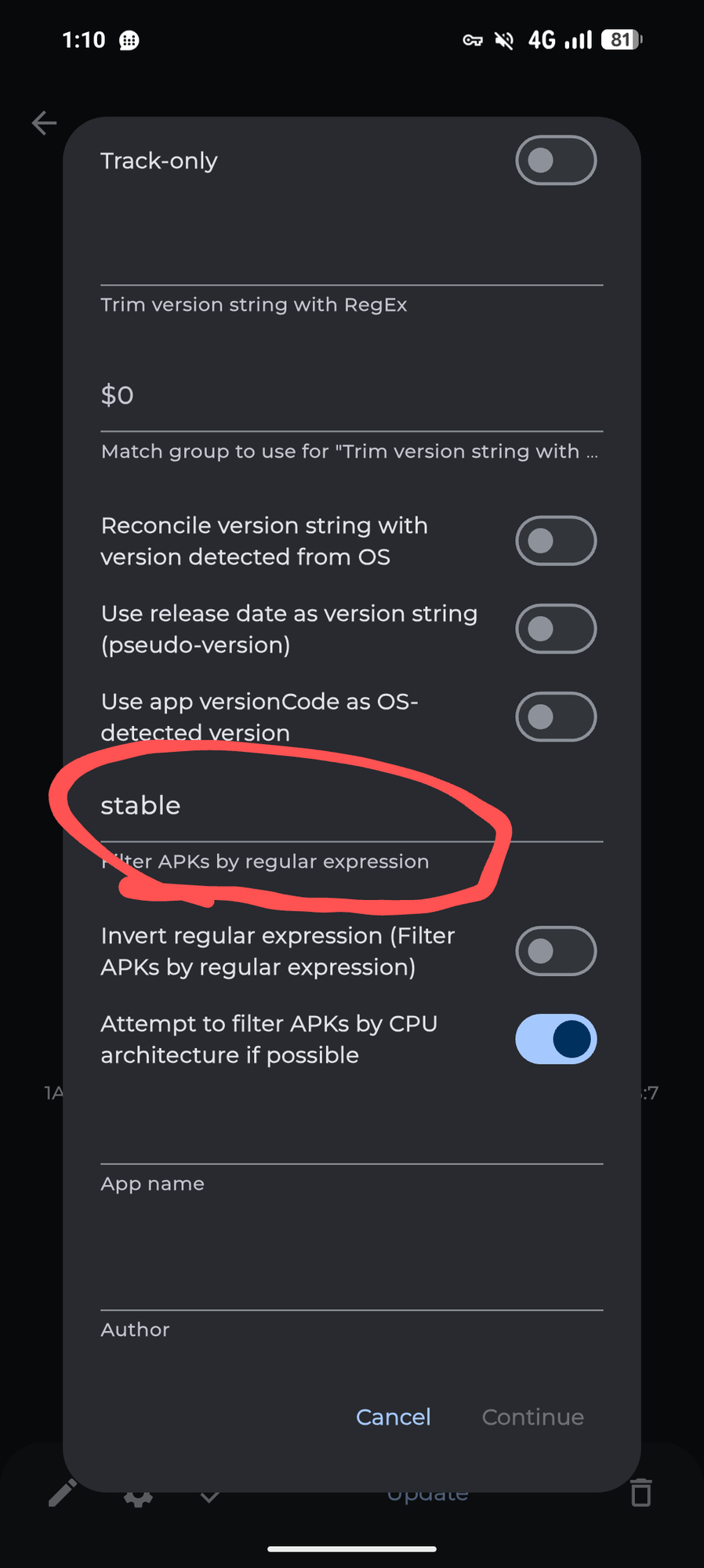
Other than that make sure you have enable background updates turned on in the settings
Interesting, I do have a few apps with multiple versions, but most of them do not and nothing is updating on its own. I wonder if obtainium stops trying to update any app if it encounters an app with multiple apk versions.
Understand that RCS is very hit or miss right now. I believe all alternate OS’s are having a problem figuring it out. Some people are using it with no problem and other people can’t get it to work. There is a looong RCS thread in the GrapheneOS forum.
Community is great. There are many very knowledgeable people there.
I honestly use google messenger still. I know. It sucks. But it’s the only thing I found that supports RCS, group texts, and things like compressing photos over SMS instead of just telling there’s a size limit, ect ect.
You are leaving your comfort zone for something new and that’s difficult for everybody, so kudos. Consequently my only advice is to take time to learn how it works and accept limitations.
As someone who messed with a lot of custom ROMs for Android in the past, I can definitely say that installing Graphene is a breeze by comparison. The one thing to note is that their web installer can’t use Firefox (at least the last time I checked), but other than that the experience has been solid. 👍
I definitely used Firefox a couple minutes months ago…I think. At least I don’t remember it being a pain in the ass
that’s good to know! i almost bricked a few phones back in the day when installing custom ROMS was crucial for a solid UX on android
One of the only complaints I have, after using GoS for the past 2 phones, is that my bank requires Google’s Play Integrity software to run on the phone, for the bank app to work. So, the bank sent me a physical pocketable scanner to use with the mobile web version. Works for now. Annoying additional bit of hardware kit to not forget home. Other than that, I love GOS.
Which bank is it that went out of their way to send a physical device. It should be celebrated I think. Mine just said good luck and use a different phone or website.
ING Bank, The Netherlands.
is this not something you could sandbox under another user?
Great question: I tried it last year, the app launched, asked my credentials, then just stalled out. No error, no progression timer or animation, just sat there. So in my case, even with a secondary account on my GOS phone, with the sole intention of getting my bank’s app working: no.
Congrats. I too also moved to GOS a little over a week ago. Found out a few of the apps fromy old phone no longer work as intended and I’m now discovering the security restrictions of Android 13 is making syncing of files in the Android/data folder very difficult.
Since you were on a version of Android before 13, my guess is that a decent number of your app incompatibilities are due to a modern version of Android rather than graphene in particular.
Definitely. It didn’t help that the application I am using doesn’t support having a custom data storage location.
Try Curve if you want to pay with your phone. You can’t sign up for N26 on GrapheneOS, but Revolut works pretty well.
Good luck. I switched over some months ago after using samsungs since the S2.
It takes some getting used to, but I dont think there’s gonna be ant bigger showstoppers in 2026.
What I miss from samsung is the gallery (and ocr) and some smaller inconviences. Oh and dex. Android’s baked in desktop isnt really up to dex on any scale